Target Costume Controversy
Mac Mini: A Compact Apple Desktop for Work, Study and Creative Tasks
Arslan Khokhar
August 25, 2026
The Mac mini is a compact desktop computer made by Apple. It provides the macOS experience in a small enclosure that can fit into a home office, classroom, recording room or professional workspace. Buyers connect their own monitor, keyboard and mouse, making the computer a flexible choice for users who already own accessories.
Apple has introduced the latest Apple Mac mini with M6 and M5 Pro chip options. The new models are available for preorder through the Apple Store and are scheduled to become available on September 22, 2026. The update brings faster processing, stronger graphics, improved artificial intelligence performance and wider memory choices in the familiar five inch square body. Apple Mac mini specifications
Apple Mac Mini Design and Desk Setup
Small Body With Practical Placement
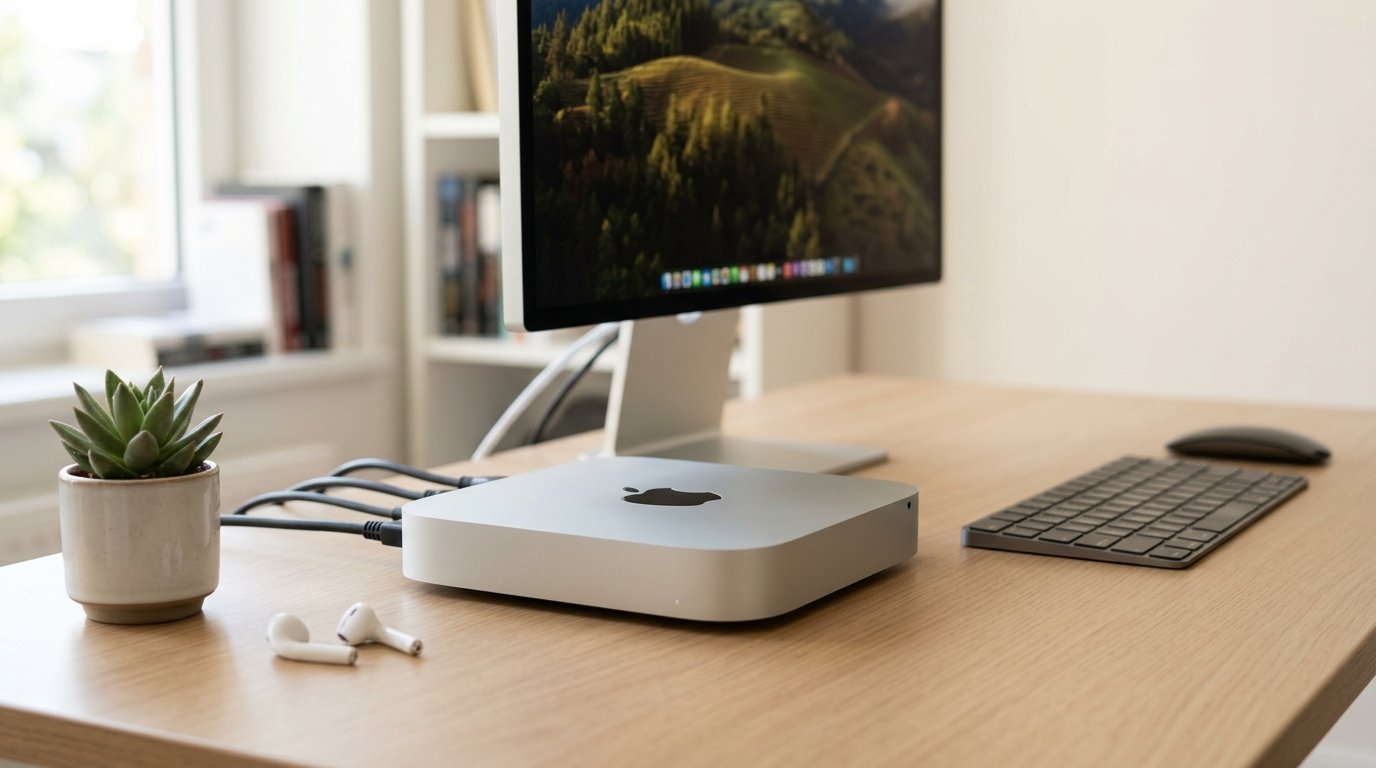
The Mac mini measures about five inches on every side, so it needs very little desk space. A user can place it beside a monitor, beneath a display stand or inside an open desk shelf. Its silver aluminum enclosure fits well with Apple Studio Display and many third party monitors.
The small size makes it useful in offices where several computers are required. Schools, reception areas, retail counters and home workstations can use it without a large computer tower. It looks simple, maybe too simple for some gaming users, but it does its work very good.
Front and Rear Connections
Apple placed frequently used connections on the front and permanent connections on the back. The front includes two USB C connections and a headphone connection. At the back, users get Thunderbolt connections, HDMI, Ethernet and a connection for electricity.
This arrangement means a memory card adapter, external drive or headphones can be connected without reaching behind the desk. It is a small change that actually makes daily usage more comfortable.
- Front USB C connections support common accessories
- HDMI connects many monitors and televisions
- Thunderbolt supports fast storage and compatible displays
- Ethernet provides steady wired networking
- The headphone connection supports speakers and wired headphones
Mac Mini M6 Performance
Apple M6 Chip
The Mac mini M6 uses a 12 core CPU and 12 core GPU. Its CPU includes two super cores, four performance cores and six efficiency cores. Apple lists a dual 16 core Neural Engine, hardware accelerated ray tracing and up to 170GB per second of memory bandwidth on selected configurations.
These specifications makes the computer suitable for web browsing, office programs, coding, photo work, content production and many artificial intelligence tasks. It can run several programs together without making the desk feel occupied by a big machine. The M6 model starts with 16GB unified memory, with 24GB and 32GB choices offered on selected setup.
The Mac mini M6 supports H.264, HEVC, ProRes, ProRes RAW and AV1 decoding. Video editors can work with common media formats with less waiting during playback and export. People editing short social videos may never use every feature, but those features give them room to grow later.
Storage Options
The entry model includes a 256GB SSD. Other configurations provide 512GB and 1TB storage. Buyers with large photo collections, local artificial intelligence models or video libraries will probably need more internal space or an external SSD.
Internal storage cannot be upgraded by the user after buying. For that reason, one should calculate storage needs before placing an order. Buying 512GB often feel more sensible for long term use, yet an external Thunderbolt drive can provide affordable extra capacity.
M5 Pro for Demanding Work
The M5 Pro Mac mini sits above the M6 version. It starts with a 15 core CPU, 16 core GPU and 24GB unified memory. Apple offers a higher configuration with an 18 core CPU and 20 core GPU. Memory can reach 64GB, and bandwidth reaches 307GB per second.
This model is aimed at developers, 3D artists, video editors, researchers and people running larger local AI models. It can manage complex scenes, ProRes RAW editing, software compilation and large data sets. The M5 Pro version include Thunderbolt 5, which supports faster compatible storage and advanced display arrangements.
Apple reports major gains for language model processing, Blender rendering and Affinity image processing compared with earlier Mac mini generations. Real results depend on software, project size and configuration, so buyers should view benchmark claims as useful reference rather than a promise for every task. Apple M6 and M5 Pro announcement
Mac Mini Versus Mac Studio
Which Apple Desktop Fits You
Mac Studio is made for heavier professional workloads and offers greater graphics capability, more memory and broader connection options. It cost considerably more and takes up more room. Mac mini remains the affordable entry into Apple desktop computing.
For writing, accounting, web design, programming, music recording and moderate video work, a Mac mini may provide everything that is required. Mac Studio makes more sense for feature film editing, advanced 3D rendering, extensive scientific projects or workloads that run at high demand for long hours.
Accessories Are Sold Separately
A Mac mini does not include a monitor, keyboard or mouse. This can lower waste for buyers who own these items, yet a new user must include accessory costs in the budget.
A practical setup may include:
- A 4K monitor with HDMI or USB C input
- Apple Magic Keyboard or a compatible keyboard
- Magic Mouse, trackpad or standard mouse
- Webcam if the monitor has no camera
- External SSD for larger files and backups
macOS, Apps and Apple Services
Mac mini runs macOS and connects with services such as iCloud, FaceTime, Messages and the App Store. Owners of an iPhone or iPad can share files, copy text across devices and answer calls through the Mac. This integration is one major reason many people move to Mac.
Popular applications include Final Cut Pro, Logic Pro, Xcode, Microsoft 365, Adobe Photoshop, DaVinci Resolve and Google Chrome. Software availability should be checked before replacing a Windows computer, since some industry programs remains limited to Windows.
Apple Intelligence features can assist with writing, image tasks and communication on supported systems and languages. Availability may vary by country, language and software version.
Buying From the Apple Store
The Apple Store lets customers select memory, storage and networking configurations. Education pricing may be available to qualifying students and educators. Apple Trade In, financing and Personal Setup services can be available in supported regions. Buy Mac mini from Apple
People searching for “ins” beside Mac may mean installation instructions, insurance information or an abbreviated search query. The official Apple support guide provides setup details for monitor connections, accessories, macOS and first use.
Frequently Asked Questions
Is the Mac Mini M6 Good for Students?
Yes. It can handle research, presentations, coding, online classes and creative assignments. Students still need a monitor and accessories, which increases the complete setup cost.
Can Mac Mini Run Two or More Displays?
Yes, supported display numbers and resolutions depend on the chip and connection arrangement. Buyers using several high resolution displays should review Apple specifications before ordering.
Is Mac Mini Good for Gaming?
It can run games available for macOS, and the M6 GPU supports ray tracing. The game catalog remains smaller than Windows, so serious gamers should check compatibility for their favorite titles.
Can Memory Be Upgraded Later?
No. Unified memory is selected during purchase and cannot be replaced later. Choose enough memory for future software needs.
Is Mac Studio Better Than Mac Mini?
Mac Studio offers more capacity for extreme professional work. Mac mini is smaller, less expensive and suitable for a wider group of home, education and business users.
Share It
Previous Post
Next Post
Recent Posts